Run your ISP from one screen

saRa is billing and RADIUS in one place. Renew a customer at the counter and the payment, the invoice, the cash book and the router all know at once.

30 days free, no card needed. Built for ISPs in Pakistan: rupees, cash counters, resellers and PTA requests

Renew demo.userExpired
Package20 Mbps Home · Rs 2,500 / 1 month
Periods1
PaymentCashBank transferLater
Amount received (Rs)
Expires now6 Nov 2026
New expiry—
TotalRs 2,500
Dues leftRs 2,500
CloseRenew · Rs 2,500
Cash in hand todayRs 0
  1. Invoice made and paid
  2. Cash book updated
  3. New expiry read by RADIUS
  4. Back online, out of the walled garden
One renewal in saRa, with demo data

What staff do in saRa is what the network does

FreeRADIUS reads saRa’s own database. There is no export, no sync and no second system to keep in step.

When a renewal is saved, the router lets the customer back on with the new expiry. When a customer expires, the router sends them to a walled garden where they can still reach the pay page.

  1. The counterStaff renew, take cash, print the receipt
  2. saRaInvoice, payment, cash book and new expiry in one step
  3. FreeRADIUSReads the login and expiry straight from saRa’s database
  4. MikroTikLets the customer on at the package speed

Everything an ISP does in a day

The same screens your staff will use, from the subscriber list to the cash book.

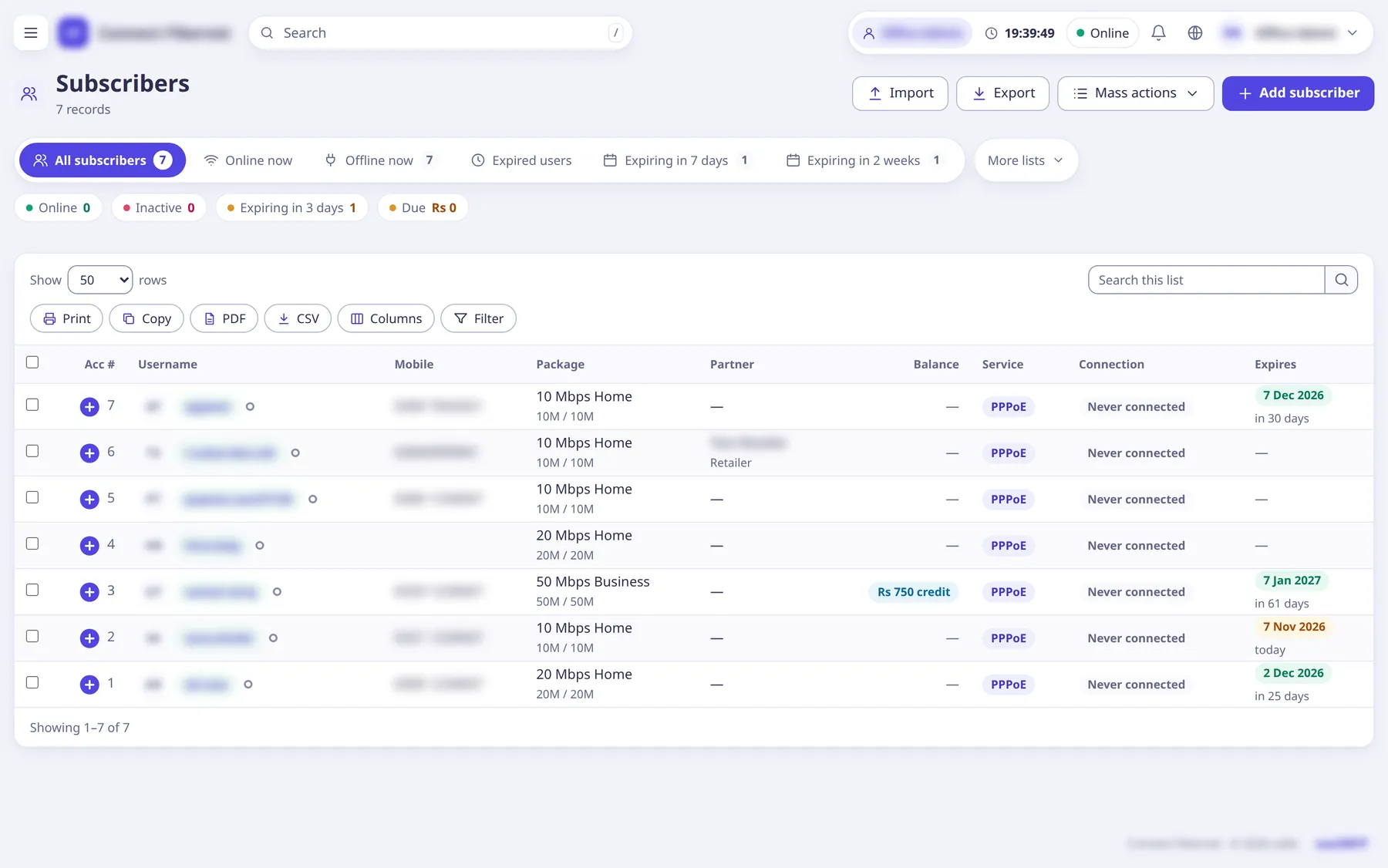
Subscribers list with online, expired and expiring tabs and Renew on each row

Subscribers

Every customer and their PPPoE or hotspot login in one list, with the lists an ISP checks every day one tap away.

  • Online now, offline, expired, expiring in 7 days or 2 weeks
  • Columns that do not fit fold into a “+” row
  • Search, filters, print, CSV and mass actions
More on subscribers
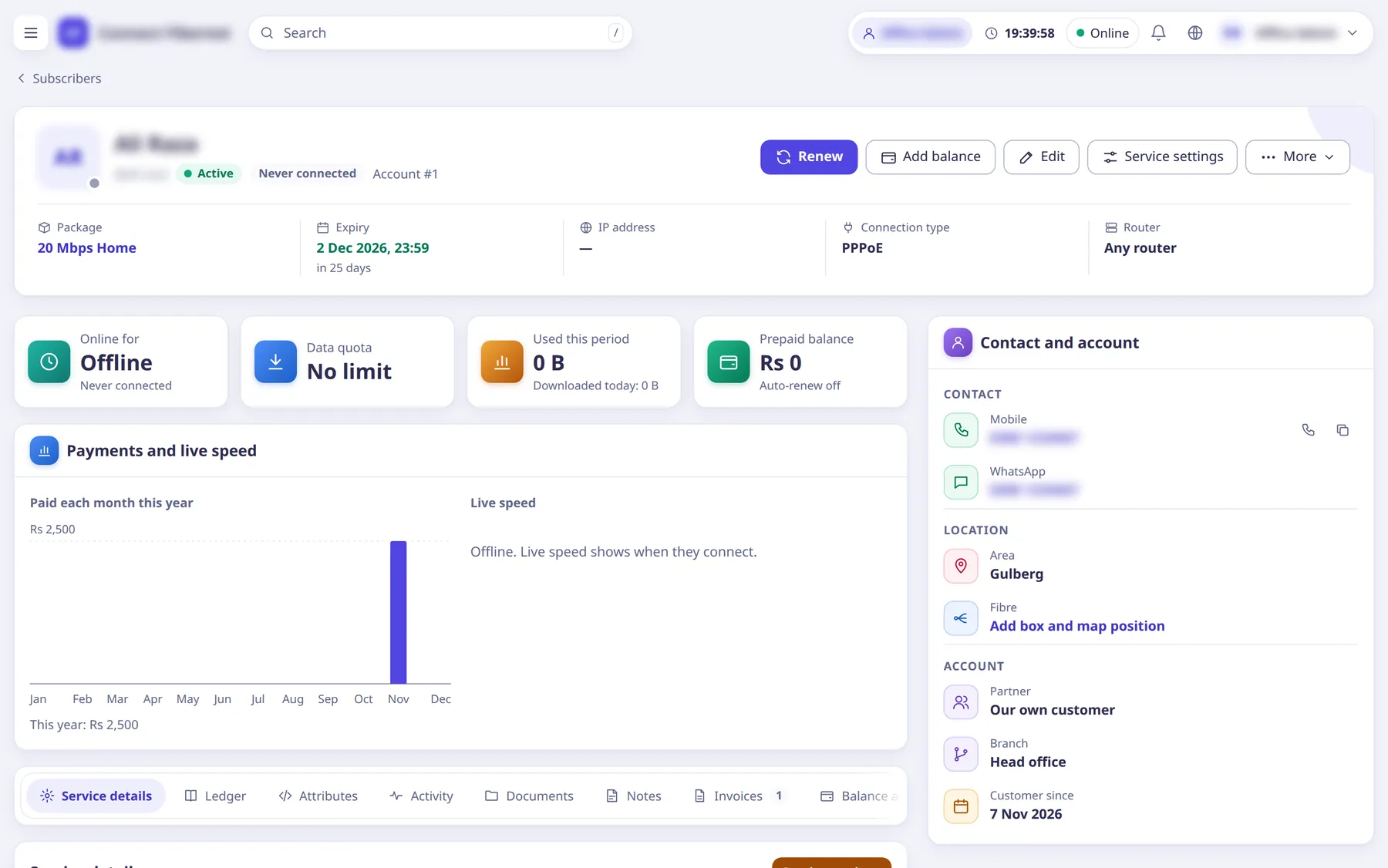
Subscriber profile: package, expiry, balance, contact and account, payments and live speed

One profile per customer

Package, expiry, balance, contact, router and the whole money story of one subscriber, with Renew as the first button.

  • Ledger, invoices, documents, notes and activity in tabs
  • Live speed while they are online
  • Add balance, edit, service settings, more
How to add a subscriber
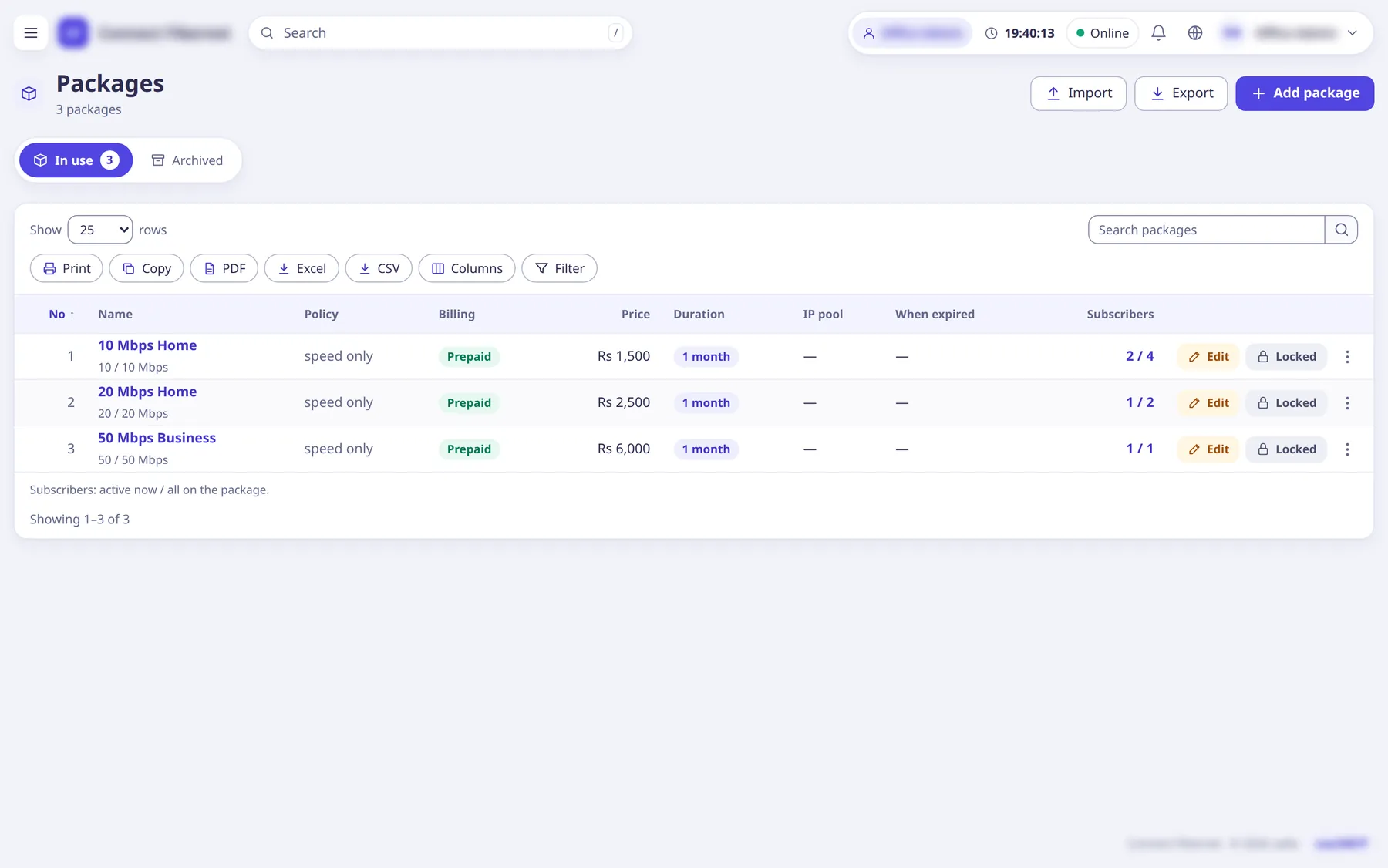
Packages list with speed, price and subscribers on each

Packages

Speed, price and period for each package, plus the rules FreeRADIUS hands out at every login.

  • Prepaid or postpaid
  • Policies, IP pools, taxes and extra fees
  • Partner costs set per reseller
How to create packages
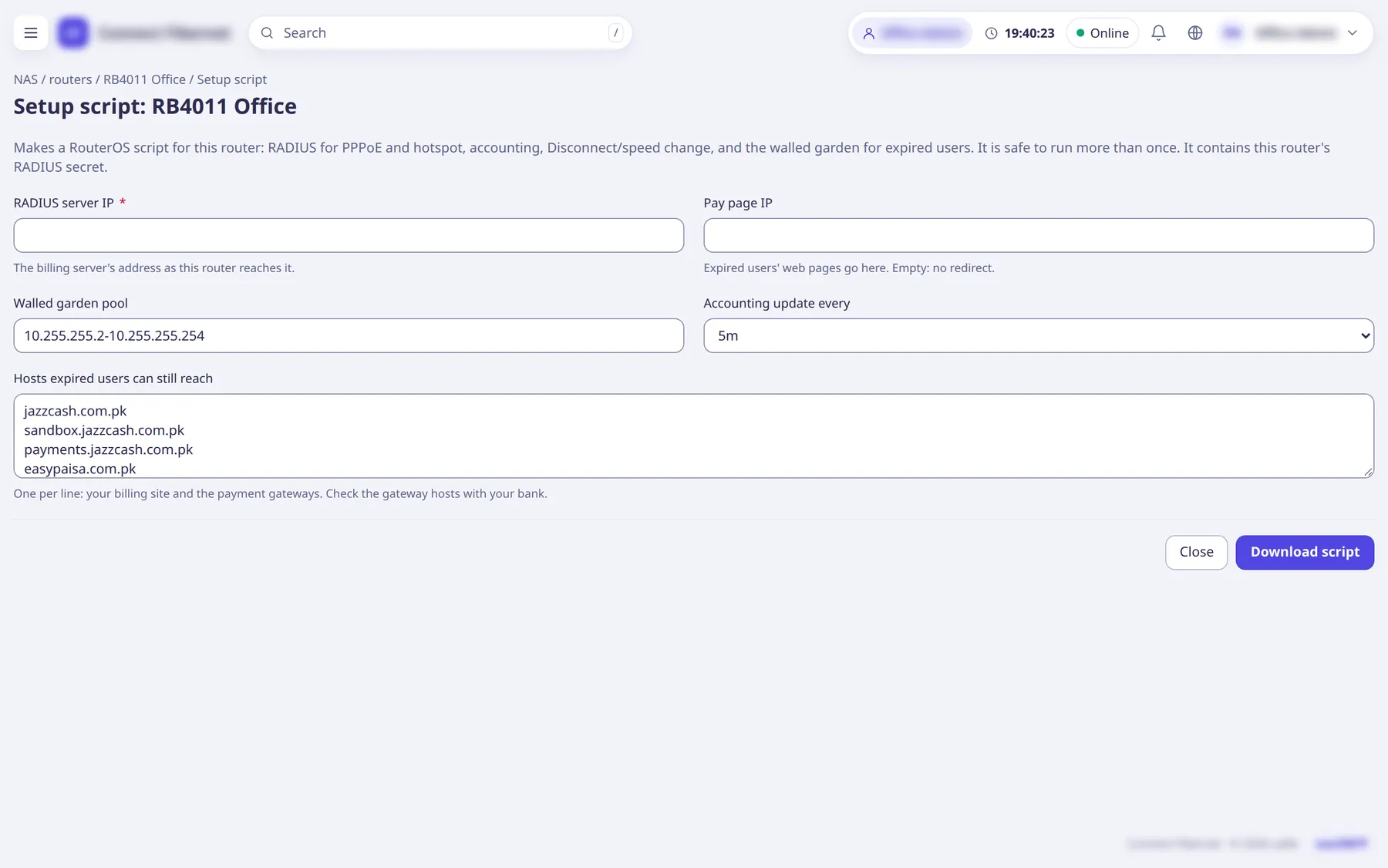
Setup script page for a MikroTik router: RADIUS server IP, pay page IP, walled garden pool

Routers

Add a MikroTik and saRa writes its setup script: RADIUS, accounting, disconnect and speed change, and the walled garden for expired customers.

  • RouterOS 6 and 7
  • Every RADIUS lookup is tied to the ISP of the router that sent it
  • Live sessions over the RouterOS API
How to add a router
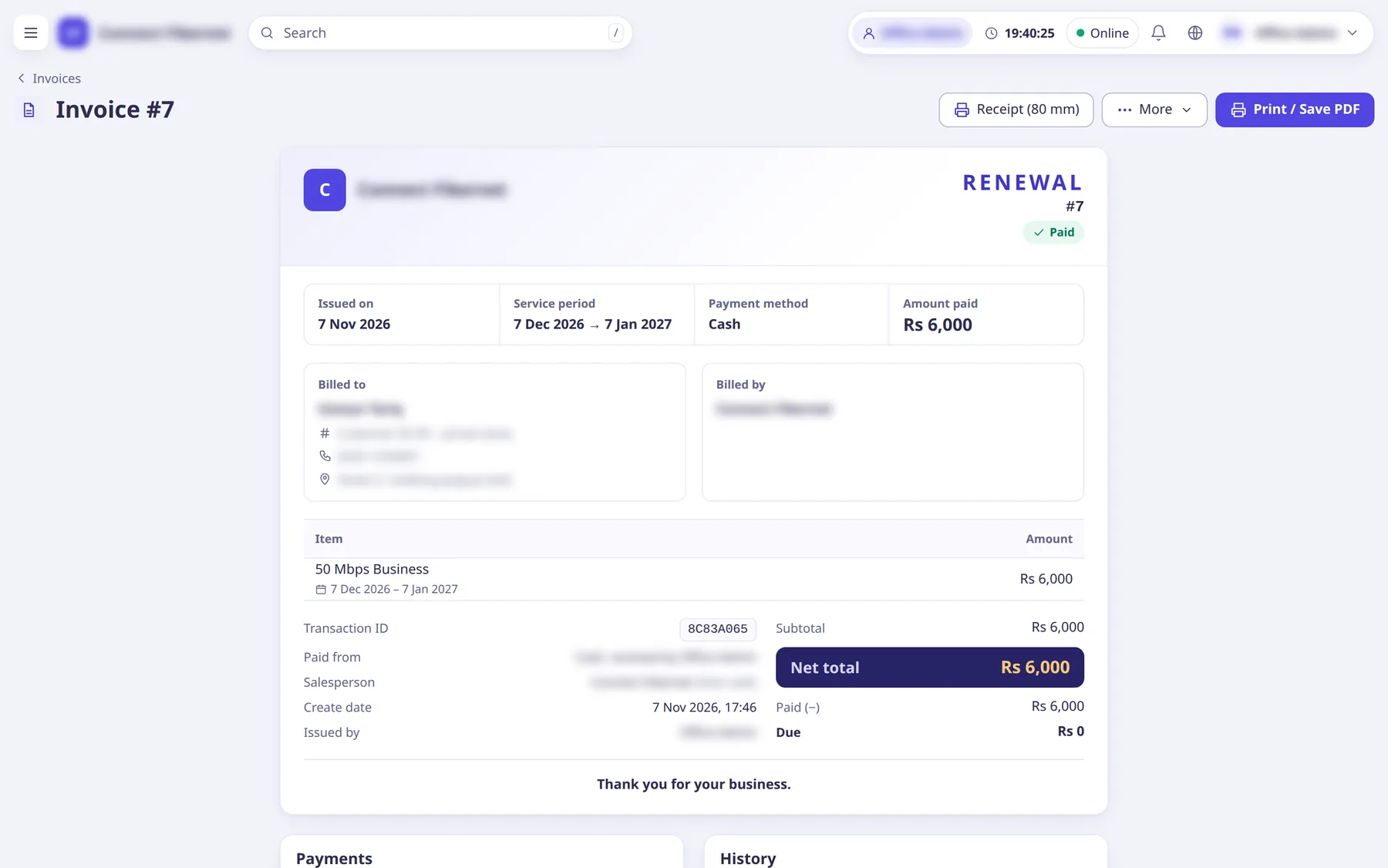
An invoice: service period, payment method, amount paid and net total

Invoices

Every renewal makes an invoice. Print it on A4 or as an 80 mm receipt, take payment on what is unpaid, reverse it with the right permission.

  • Payments table with who took them
  • Custom invoices for installation or equipment
  • Unpaid invoices in one list
How invoices work
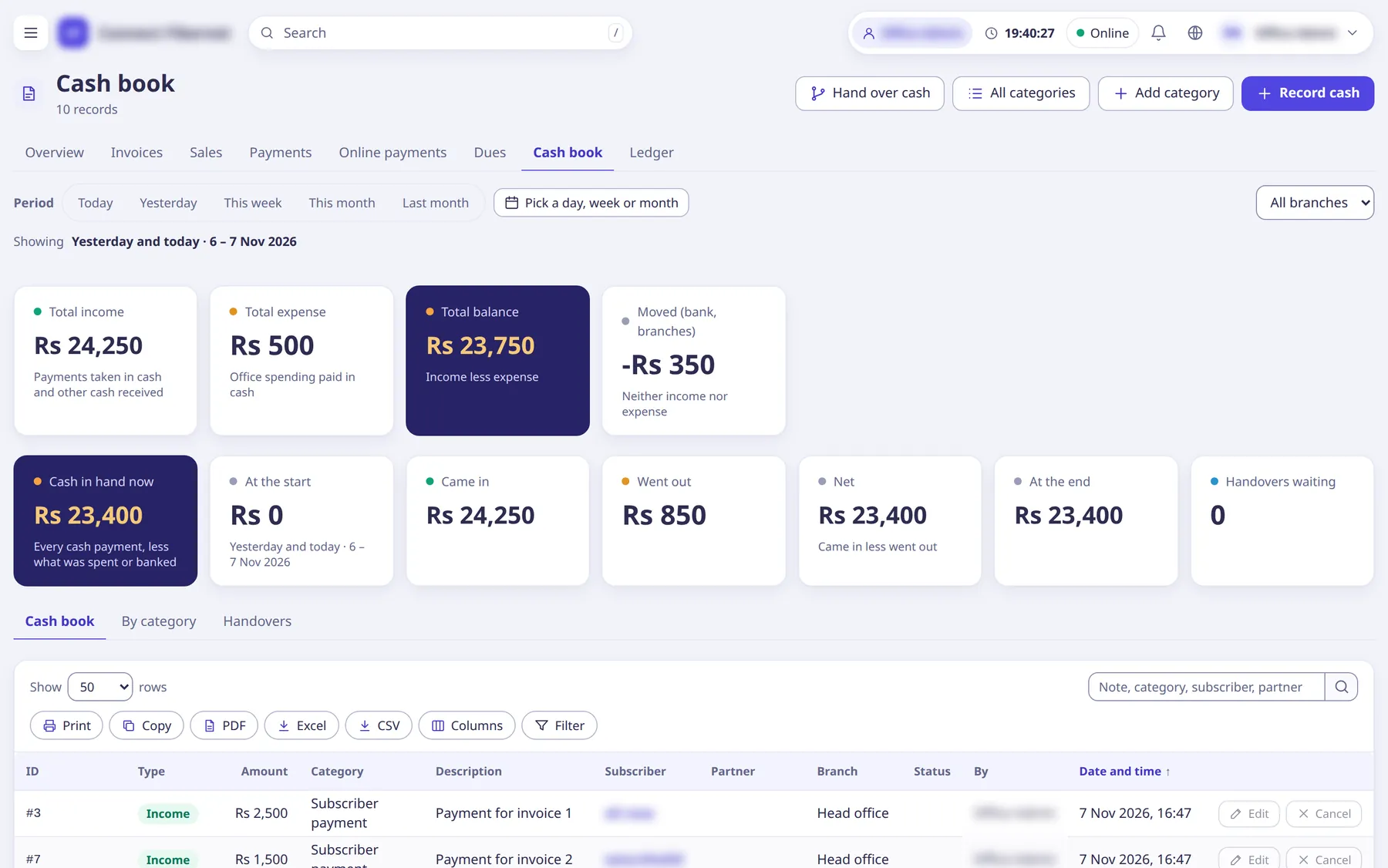
Cash book: total income, expense and balance, cash in hand, handovers waiting

Cash book

Cash taken at the counter lands in cash in hand by itself. Expenses, handovers and branch cash sit next to it.

  • Income, expense and balance for any period
  • Staff hand cash over to a branch or the head office
  • A day limit and a before-handover limit per staff login
How the cash book works
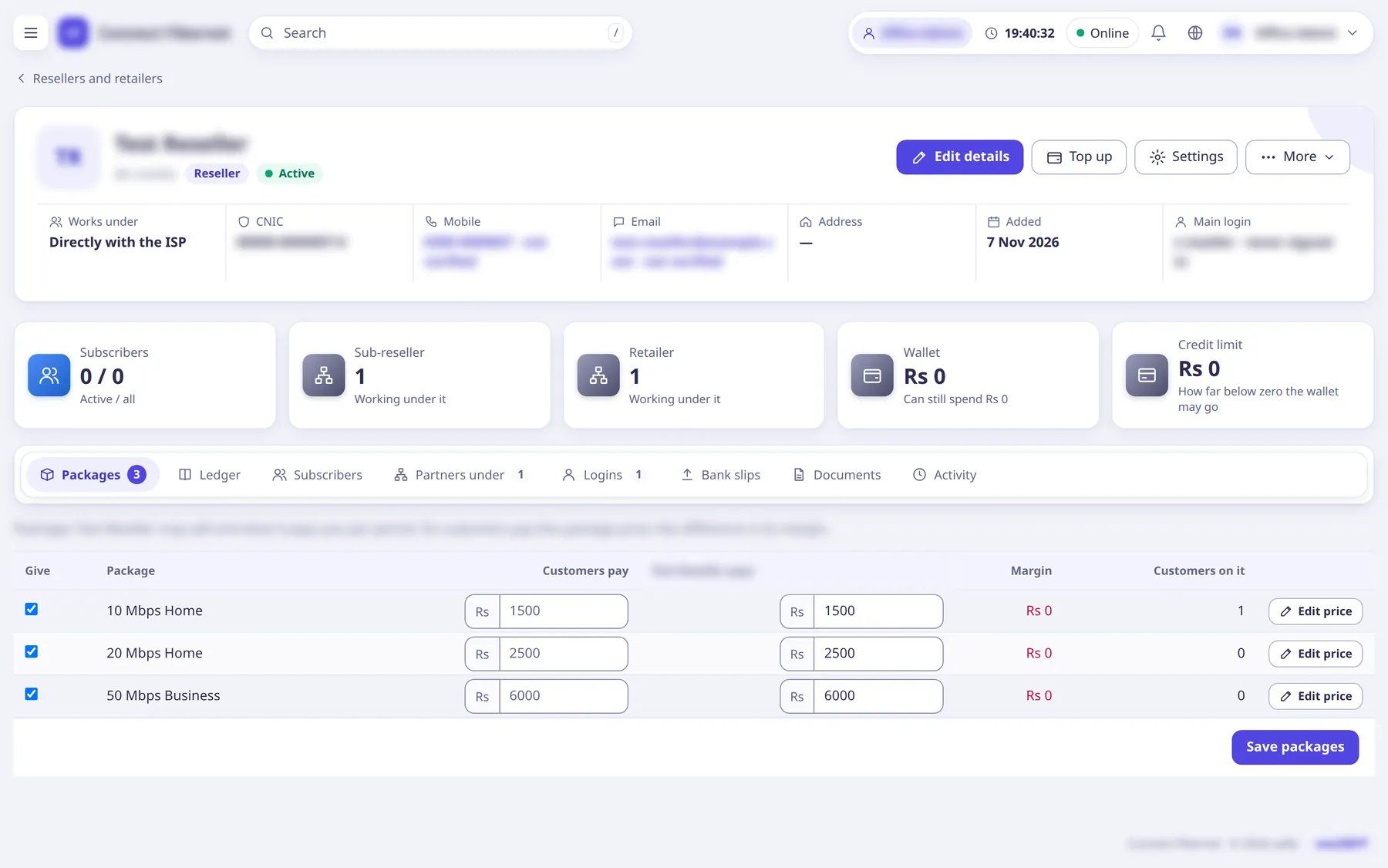
A reseller’s page: wallet, credit limit and the packages it sells with its prices

Resellers and retailers

Partners get a wallet, their own package costs and customer prices, and their own logins. Every renewal they make is paid from the wallet.

  • Optional credit limit
  • Sub-resellers and retailers below them
  • Top up, transfer, wallet ledger
How to add resellers
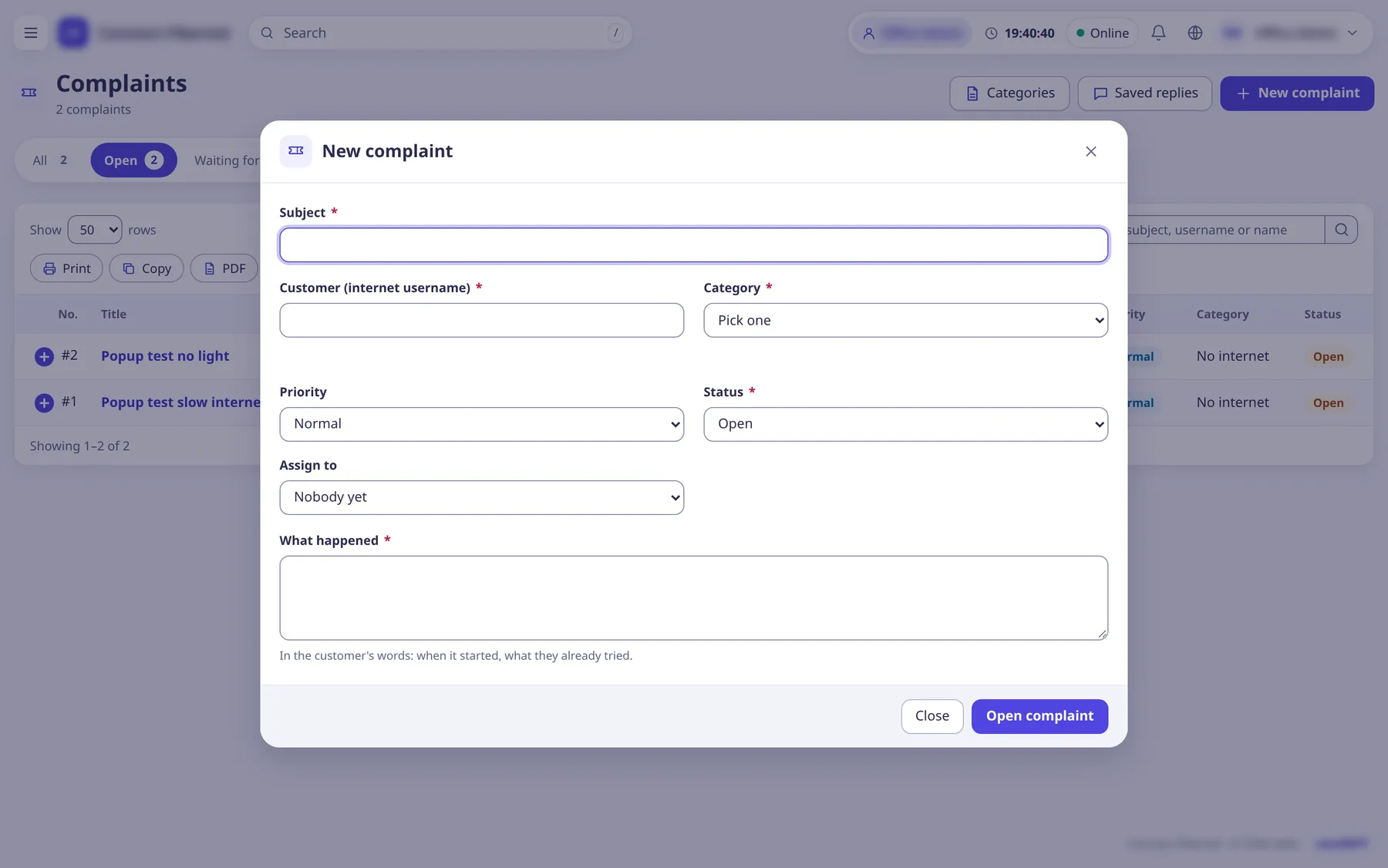
New complaint popup: subject, customer, category, priority, assignee, what happened

Complaints and chat

Complaints and chats share one inbox. Assign, reply, add internal notes, close. The customer follows along in the portal or the app.

  • Category, priority, assignee and status
  • Saved replies and file attachments
  • Automatic messages when it opens, gets a reply and closes
How complaints work
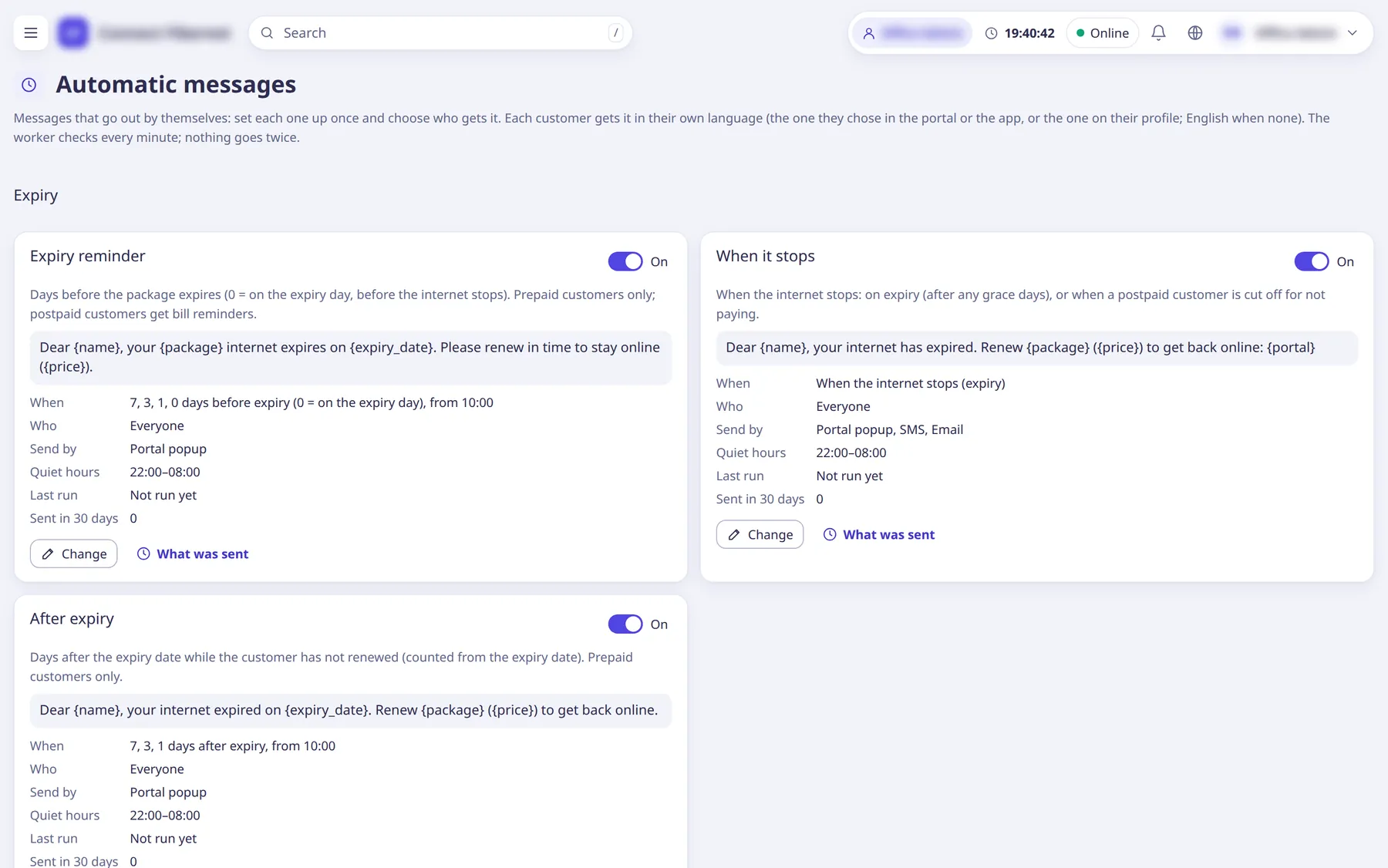
Automatic messages: expiry reminder, when it stops, after expiry, each with its schedule

Automatic messages

Expiry reminders, payment and renewal confirmations, unpaid-bill reminders and complaint updates go out by themselves, in each customer’s language.

  • SMS, WhatsApp, email, chat or a portal popup
  • Quiet hours
  • A log of what was sent
How to set them up
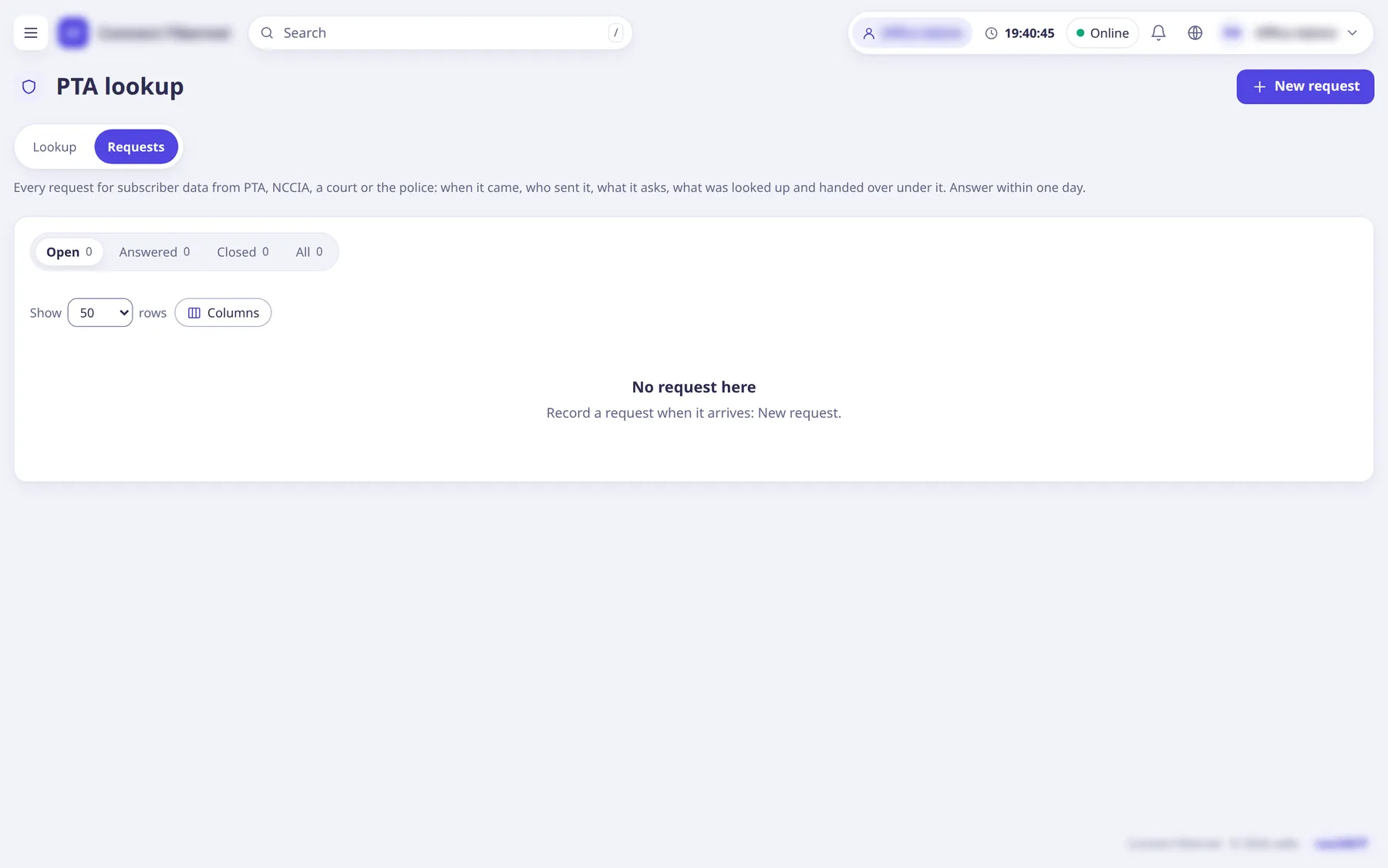
PTA request register with open, answered and closed requests

PTA lookups

When a request comes in, record it, place a hold, look up who had a public IP and port at a given time, and print the answer.

  • NAT logs from the router, kept for the period you set
  • A register of every request and its answer
  • Every search written to the audit log
How PTA lookups work
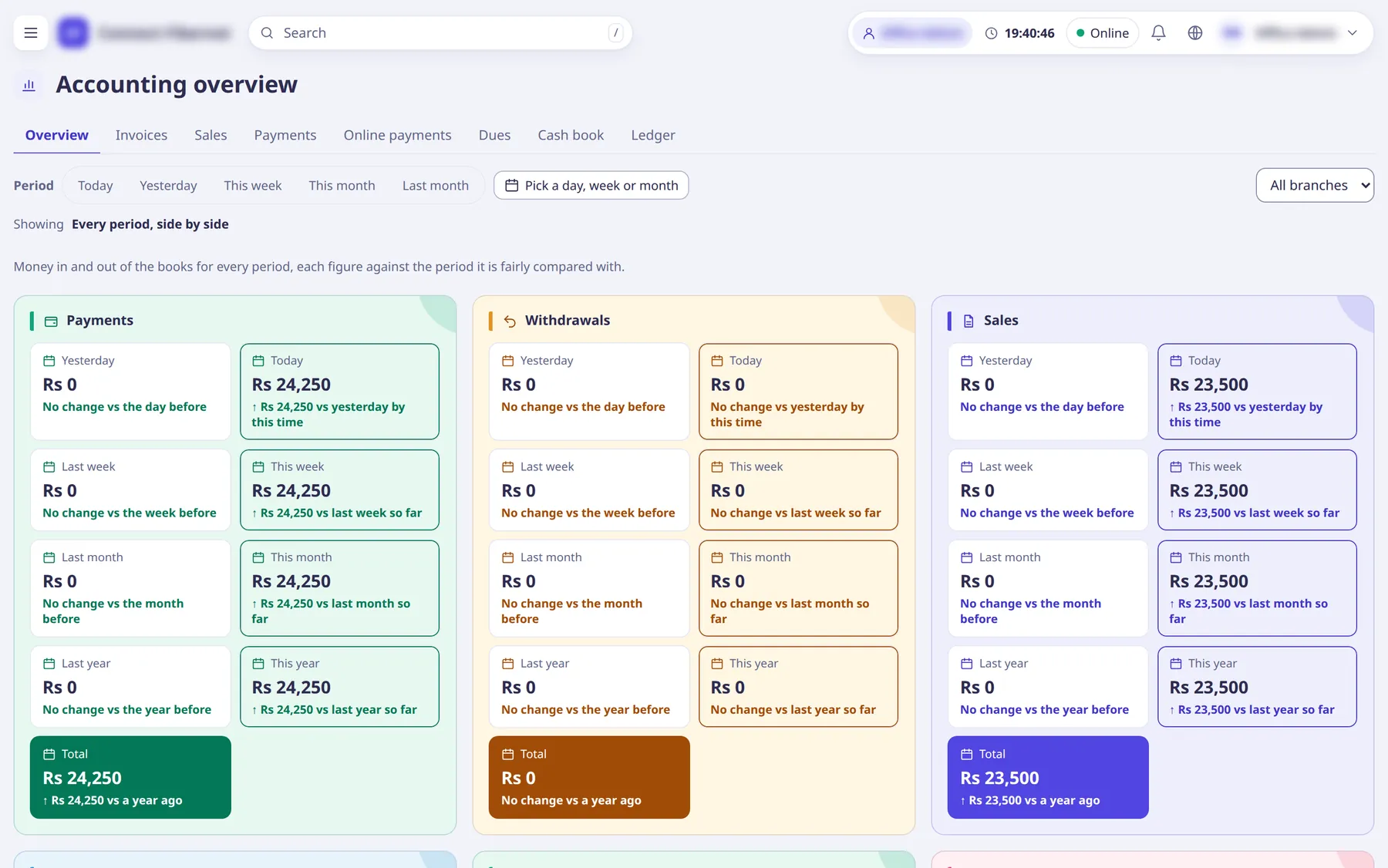
Accounting overview: payments, withdrawals and sales by period

Reports and accounting

Payments, withdrawals and sales side by side for today, this week, month and year, read from the same ledger the counter writes to.

  • Sales, collections, dues, partner-wise and expiring reports
  • Export as CSV or Excel, or print
  • Figures match the cash book
How to read reports

Made for everyone who touches the connection

ISP owners and administrators

Set up packages, routers, branches, staff, resellers and money rules, then watch the business on Home and in Accounting.

Counter and office staff

Renew customers, take payment, print receipts, open complaints and hand cash over at the end of the day.

Field staff, resellers and retailers

Add and renew customers from a phone. Resellers pay from their own wallet at their own package cost.

Customers

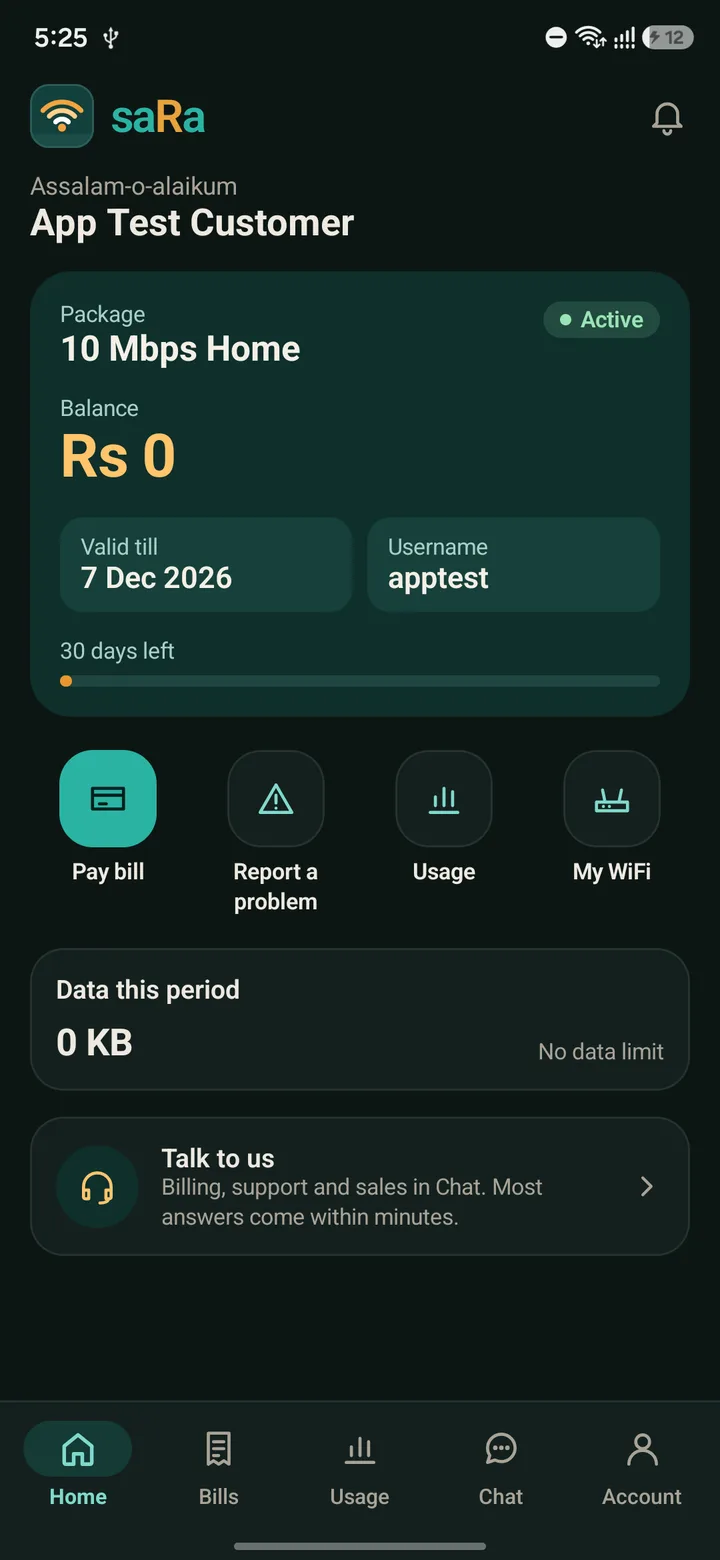
Pay, see their package, expiry and usage, change their WiFi and report a problem, in the portal or the app.

One Android app for customers and every staff level

Customers see their package, bills and usage and chat with the office. Staff and resellers work from the same app.

  • Set up with a QR codeAn administrator makes an app key; the phone scans it once.
  • Push notifications without personal dataA notification carries only ids. Names, amounts and messages stay on the saRa server: ours in the cloud, or your own.
  • Chat and complaintsThe same conversations staff see in the inbox.
saRa Android app home screen for a customer: package, balance, valid till, pay bill, usage, My WiFi

Every rupee and every record, accounted for

Money and network actions show what will happen before they happen. The books and the logs keep the rest.

Security

  • Each ISP sees only its own data. Row-level security in the database keeps ISPs apart on one installation.
  • Every RADIUS lookup is tied to its router’s ISP. A router can only sign in its own ISP’s customers.
  • Two-step sign-in with an app code or SMS; the platform can require it for administrators.
  • Limits per staff login: a staff balance for renewals, cash limits per day and before handover, allowed sign-in addresses.
  • No double charges. A double click or a retry on a payment form never charges twice.

PTA and lawful requests

  • NAT logs from the router, received over syslog and kept for the period you set (400 days by default).
  • Look up a public IP and port at a given time and see which subscriber had it.
  • A register of every request: when it came, who sent it, what was asked and what was handed over.
  • Holds and printed letters keep the named days and the lines relied on.
  • Each day’s logs are sealed so a change afterwards shows.

One subscription. Everything in it.

Nothing hidden behind a second payment or an integration. Others charge separately for much of this.

  • Billing and RADIUS in one place
  • Unlimited staff logins
  • Unlimited routers
  • Branches, resellers, sub-resellers and retailers
  • WhatsApp, SMS and email automation, no platform fee
  • JazzCash, bank card and bank slips
  • Customers change their WiFi in the portal (TR-069)
  • OLTs and ONUs
  • PTA NAT logs: 400 days, sealed, IP and port lookup, request register and letter
Everything it includes, and what Others charge for it

Switch without losing a rupee

saRa’s importer brings an ISP’s history over from the old system, so the first day starts with every customer, bill and balance in place.

  • Customers, packages, invoices, payments, balances and sessions
  • Subscribers from CSV or Excel, checked before anything is saved
  • PPP profiles, pools and PPPoE users straight from a MikroTik
  • Pause automatic billing until cutover day
How the move works

Subscription

saRa is closed-source software made by sarasen and sold to ISPs by subscription. One price per size of ISP, with everything included: unlimited staff and routers, WhatsApp with no platform fee and PTA logs. The saRa app is $15 a month for any size, or $10 a month on a yearly package.

From $90a year on your own server, $150 a year hosted by us, up to 500 subscribers. 12 months for the price of 8.

Contact details for sarasen will be listed here.

See how a renewal, a router and a day close work, step by step

Eighteen guides with screenshots, and every setting explained.