 saRa
How to create packages, policies and fee groups
Steps
Optional first: open Policies →
Policies
and clickAdd policy
. Give aGroup Name
and add attribute rows (Attribute List
,Attribute OP
,Attribute Type
= Check or Reply,Attribute Name
,Attribute Value
);More rows
adds rows; clickSubmit
.A policy is a named group of RADIUS attributes that packages can use, for example Mikrotik-Rate-Limit = 1M/1M with Mikrotik-Address-List = expired. Policies can also be imported and exported as CSV.
Optional: Packages →
Tax and extra fees
→Add fee group
. Enter aName
, then add charges:Charge
,How much
(Percent of price / Percent of price and charges above / Fixed rupees),Percent or rupees
andTax?
(No: a fee / Yes: tax);Add charge
adds more; clickSave fee group
.Each renewal adds these charges after the subscriber's discount. The form shows a live example on a Rs 1,000 package.
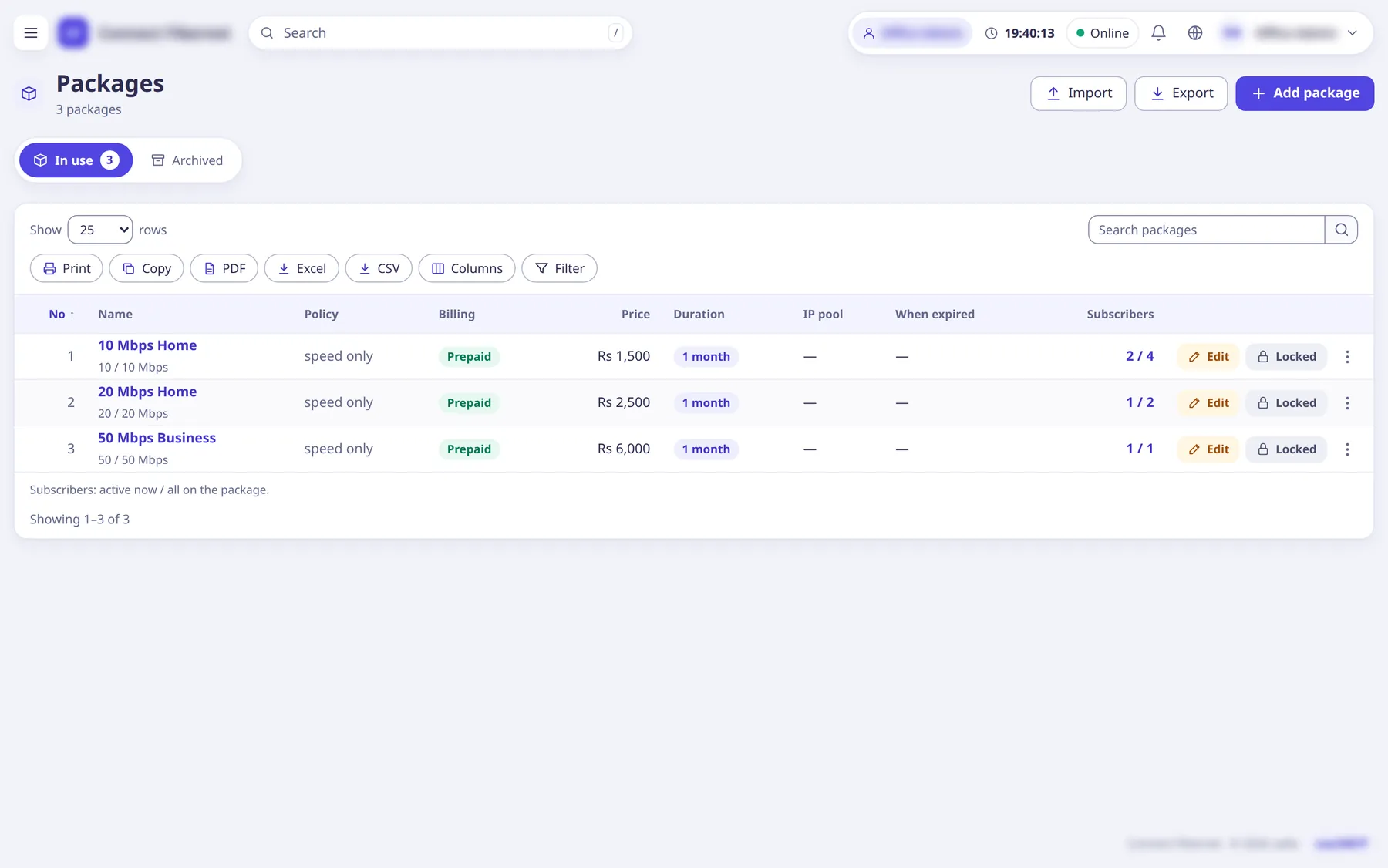
Open Packages →
Packages
and clickAdd package
(large popup).Import and Export buttons sit next to it (CSV).
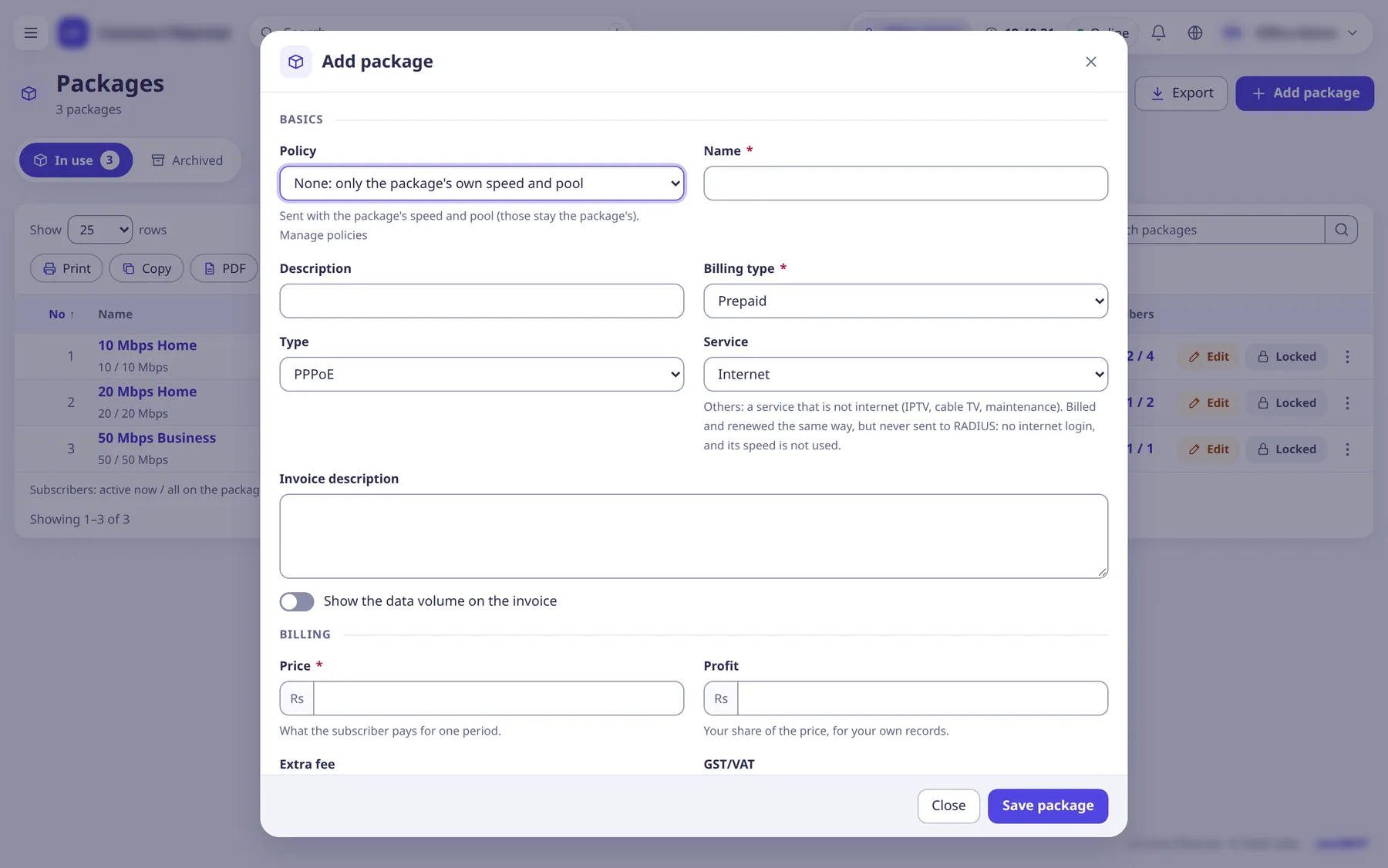
Basics: choose a
Policy
(optional), enterName
,Description
,Billing type
(Prepaid or Postpaid),Type
(PPPoE or Hotspot) andService
.A
Service
ofOthers
(IPTV, cable TV, maintenance) is billed and renewed the same way but never sent to RADIUS.Billing: enter the
Price
(what the subscriber pays for one period), optionalProfit
,Extra fee
,GST/VAT
,Auto-renew
,Auto payment
, aTax and extra fees
group, and for postpaidDays to pay (postpaid)
.A new price applies from each subscriber's next renewal.
Expiry: set
Duration
with itsUnit
, and optionallyFixed expiry day
,Fixed expiry time
orAdd the days left
.With a fixed expiry day, prepaid renewals end on that day and the first period is priced pro rata; postpaid uses it as the bill day.
Bandwidth: enter
Download (Mbps)
andUpload (Mbps)
(leave both empty when the chosen policy sets the speed); optionally switch onSpeed by time of day
(up to 12 times),Burst
and anAllocation group
.On an existing package
Send the new speed to subscribers online now
pushes the change to live sessions; otherwise they get it at their next login.Optional: IP pools (IP pool, Expired IPv4 pool, Disabled IPv4 pool, IPv6 pools,
When expired
,When net off or disabled
), Data quota (FUP, per day, per week,Carry leftover to the next period
) and Session quota (Limit online time
), and Availability (Allow self-activation
,Apply to users
,Apply to partners
).Click
Save package
when done.
What saRa does
The package appears in the list and can be sold. Its speed, pool and quota rules are what FreeRADIUS returns at each login. Renewals use its price, duration and fees; Apply to users
copies auto-renew onto its subscribers and sends a new speed to those online.
Good to know
- Archived packages cannot be renewed.
- Partners (resellers and retailers) get packages with their own cost price from the partner's page:
Give a package
. - Policies, fee groups and allocations have their own menu entries under Packages / Policies.