 saRa
SMS, WhatsApp and email
Set up the providers messages go out through (SMS gateway, WhatsApp Business Cloud API, your own SMTP mail server), the SMS and email texts for automatic events, and send a test message. Each channel shows a Not set up / On / Off pill.
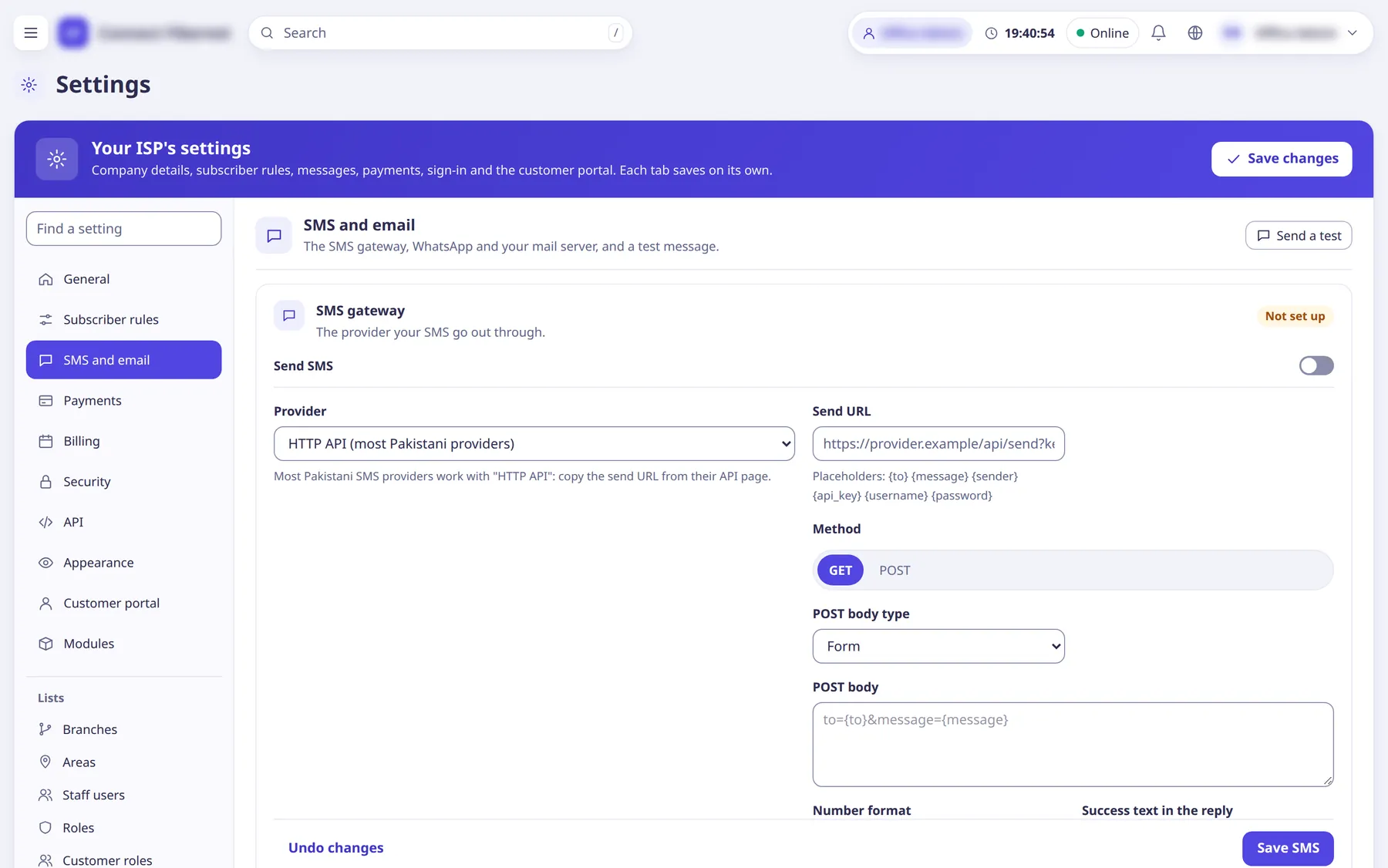
The settings
Send SMS
SwitchTurns SMS sending on.
- Default
- off
- When to change
- After the provider details below are filled in.
Provider (SMS)
ChoiceHTTP API sends through the URL you give; Log only writes the message to the log and sends nothing (for testing).
- Default
- HTTP API (most Pakistani providers)
- Options
- HTTP API (most Pakistani providers)Log only (testing: nothing is sent)
- When to change
- Use Log only while testing.
Send URL
TextThe provider's send address. Placeholders: {to} {message} {sender} {api_key} {username} {password}.
- Default
- empty
- When to change
- Copy it from your SMS provider's API page.
Method
ChoiceHow the request is sent.
- Default
- GET
- Options
- GETPOST
- When to change
- Follow your provider's API.
POST body type
ChoiceFor POST: send the body as form fields or JSON.
- Default
- Form
- Options
- FormJSON
- When to change
- Follow your provider's API.
POST body
TextFor POST: the body template, for example to={to}&message={message}.
- Default
- empty
- When to change
- Only when the method is POST.
Number format
ChoiceHow mobile numbers are written to the provider.
- Default
- 923001234567 (first option)
- Options
- 92300123456703001234567+923001234567
- When to change
- Follow your provider's API.
Success text in the reply
TextText the provider's reply must contain for the message to count as sent.
- Default
- empty (example: OK)
- When to change
- If your provider replies 200 even on errors.
API key
TextProvider key, available as {api_key}.
- Default
- empty (stored secret; shown as 'Saved. Leave empty to keep' once saved)
- When to change
- If your provider needs a key.
API username
TextProvider username, available as {username}.
- Default
- empty (stored secret)
- When to change
- If your provider needs it.
API password
TextProvider password, available as {password}.
- Default
- empty (stored secret)
- When to change
- If your provider needs it.
Sender ID / mask
TextThe sender name or mask shown to the recipient, available as {sender}.
- Default
- empty
- When to change
- If your provider uses approved masks.
Messages per minute (SMS)
NumberSending speed limit for the SMS queue.
- Default
- 60
- When to change
- Lower it if your provider throttles.
Send WhatsApp messages
SwitchTurns WhatsApp sending on (WhatsApp Business Cloud API from Meta). Messages you start must use templates approved in WhatsApp Manager.
- Default
- off
- When to change
- After the details below are filled in.
Phone number ID
TextYour WhatsApp Business phone number ID.
- Default
- empty
- When to change
- From the Meta developer console.
Access token
TextThe API access token.
- Default
- empty (stored secret)
- When to change
- From the Meta developer console.
Graph API version
TextGraph API version to call.
- Default
- empty (example: v21.0)
- When to change
- Only if Meta retires the version in use.
Messages per minute (WhatsApp)
NumberSending speed limit.
- Default
- 60
- When to change
- Lower it if you hit WhatsApp limits.
Templates
TextOne per line: event = template name, language, variables (for example expiry_reminder = expiry_reminder, en, name, expiry, amount).
- Default
- empty
- When to change
- Map each automatic event to its approved WhatsApp template.
Send email
SwitchTurns email sending on. Mail is sent to subscribers who have an email address, through your own mail server (Gmail, Zoho, cPanel, ...).
- Default
- off
- When to change
- After the SMTP details are filled in.
SMTP server
TextMail server host name.
- Default
- empty (example: smtp.gmail.com)
- When to change
- From your mail provider.
Port
NumberSMTP port.
- Default
- empty (example: 587)
- When to change
- From your mail provider.
Security
ChoiceConnection security.
- Default
- STARTTLS (587)
- Options
- NoneSTARTTLS (587)TLS (465)
- When to change
- Follow your mail provider.
Username (email)
TextSMTP login name.
- Default
- empty
- When to change
- From your mail provider.
Password (email)
TextSMTP password.
- Default
- empty (stored secret)
- When to change
- From your mail provider.
Sender address
TextThe From address.
- Default
- empty (example: [email protected])
- When to change
- Use an address your server may send as.
Sender name
TextThe From name.
- Default
- empty (placeholder: Your ISP)
- When to change
- Optional.
Emails per minute
NumberSending speed limit for email.
- Default
- 30
- When to change
- Lower it if your mail provider limits you.
SMS texts
ListOne row per automatic event, each with a Send switch, the SMS text (variables such as {name} {username} {package} {expiry} {amount} {invoice_no} {days} {isp} {balance} {pay_link} {reference} {reason} {ticket_no} {subject} {link} {message} {due} {dues} {isp_phone} {portal}) and a Use default button. Events: after an activation or renewal; balance added (deposit); a due invoice is paid online; a bank transfer slip could not be confirmed; a complaint is opened; staff reply to a complaint; before expiry; when the subscriber reaches cutoff; when the data quota is used up and FUP speed starts; auto-renew could not run (not enough balance); a message staff send to chosen subscribers; a postpaid bill is issued. Keep texts under 160 characters to stay one SMS.
- Default
- built-in default text per event
- When to change
- To change the wording customers receive.
Email texts
ListPer event: Send switch, subject and body.
- Default
- SMS text is sent by email too when left empty
- When to change
- To give email its own wording.
Send a test (popup)
ListButton on the panel head. Fields: Channel (SMS, WhatsApp or Email) and Mobile (or an email address for email). Sent at once, not through the queue; the provider's answer shows on the messaging settings.
- Default
- n/a
- When to change
- After changing provider details.